Back office
Plan events, fill shifts and keep staff, clients and payroll in one place. Everything your office does in Staff Buddy, from the calendar to the export.
How it works: Back officeStaff app
A simple, intuitive and blazing fast app for your staff to accept shifts, check details, check in and chat. All from their phone. Free.
When you offer someone a shift, it arrives as an invitation. They accept or decline in the app. Nobody scrolls back through a group chat to find out who said yes, and a decline is made in the app, so you can offer the shift to someone else.
Staff also tell you when they cannot work. They set their availability in the app, which replaces the round of messages asking who is free on Saturday.
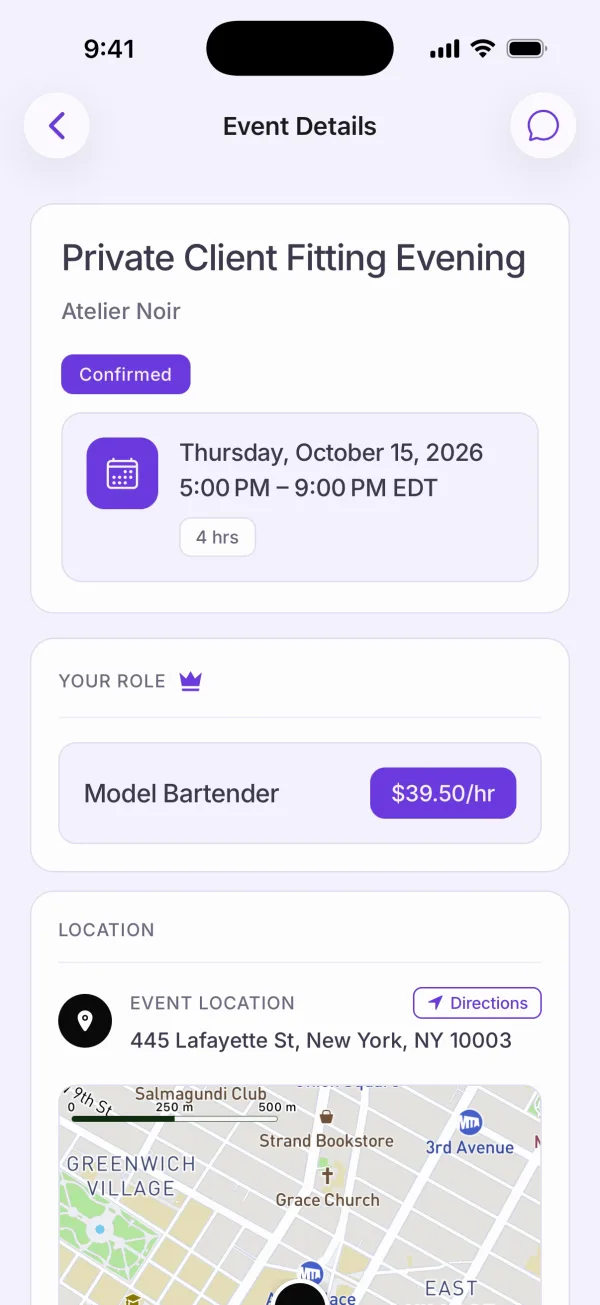
The event screen holds the details in one place: the date and time, the role, the job description and the location with directions.
No more searching through multiple chats to piece the details together. If something is unclear, the answer is one tap away in the event chat.
Every event has its own chat. Questions about that shift go in that chat and stay with it. Your coordinators answer once, in the right place, and the people on that event see the answer.
Staff can also upload documents from the app. Your staff do not have to find an email address or wait until they are next in the office.
Staff check in and check out with GPS, inside the venue area. The check is tied to the place of the event, so it counts at the venue, and check-out works the same way when the shift ends.
Reception at a venue is not always good. Check-in and check-out work with poor reception and offline, and sync when the phone reconnects.
Expenses can be added in the app and approved in the back office. An approved expense is added to the event’s cost breakdown, so it is counted with the rest of the job instead of in a pile of receipts at the end of the month.
Your staff read the app in their own language. The app is available in English, Spanish, German, Portuguese, and French.
Staff cannot see each other’s phone numbers. That is a real difference from a WhatsApp group, where every member sees every number.
Yes. Staff use the Staff Buddy app on iOS and on Android.
No. The app is free for your staff.
No. Staff cannot see each other's phone numbers in the app.
Yes. Staff set their availability in the app, so you do not have to collect it by message.
If you’d rather talk it through, book a call with the founder and bring your own events.